Date: 2025-06-26
Description: An independent study about PIC, what it is, how it works, and a simple implementation.
Status: Done
Tags: #shellcode #IAT #PIC #PE #PEB #TEB
Introduction
Position-Independent Shellcode or PIC consists of code that executes correctly regardless of the address at which it is loaded. Simply put, it is a block of code that must be functional and written entirely in the .text section of the PE (which makes it independent). This shellcode can be compiled in byte format or extracted using helper tools like extract.py.
Structure of a PE file
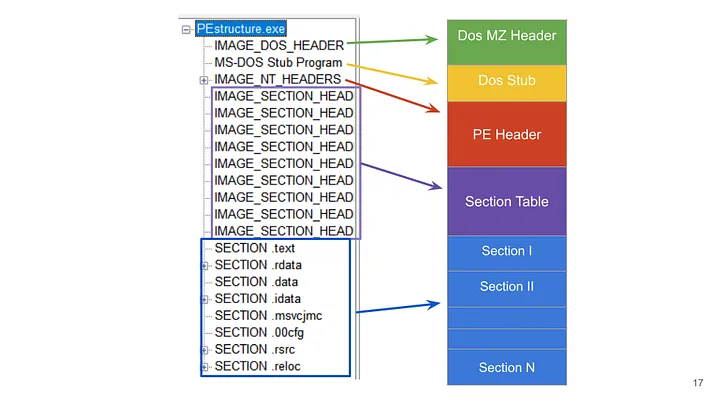
A PE (Portable Executable) file has a structure that has been widely known and studied for many years, but for the purposes of this post, our focus will be limited to the .text, .data, and .idata sections, which respectively store the code, strings, and the IAT (Import Address Tables).
Structure of a PIC
The .text section stores all the compiled assembly instructions, and the .data section stores strings used in the code.
To ensure our code resides entirely within the .text section, we must adopt the following strategies during shellcode development:
- Avoid using global variables. (They are stored in the
.datasection.) - Avoid using strings in the conventional way. (They are stored in the
.datasection.) - Avoid using imports. (They are written in the IAT, in the
.idatasection.)
Based on this, our code will be developed to meet these conditions.
Resolving dependencies at runtime
On Windows, the ntdll.dll and kernel32.dll libraries are by design loaded by all user, service, or system-initialized processes. For instance, to use ==common functions in code injections== like VirtualAllocEx, WriteProcessMemory, VirtualProtectEx, and CreateRemoteThread, while avoiding imports in the IAT, it’s necessary to use GetModuleHandle, GetProcAddress, and LoadLibraryA to dynamically load these functions at runtime. However, although injection functions will no longer be written into the IAT, the helper functions used to load them (GetModuleHandle, GetProcAddress, and LoadLibraryA) will still be written, disqualifying the code as PIC.
To overcome this limitation, we will re-create custom functions equivalent to GetProcAddress and GetModuleHandleA.
Implementations of these custom functions already exist in community projects, such as VX-API/GetProcAddress.cpp and VX-API/GetModuleHandleEx2.cpp. Below, I’ll introduce some improvements from a[[Position-Independent Shellcode]]z PIC perspective, including additional helper functions used within those mentioned above—one for comparing ASCII strings and another to force API names and exported function names to uppercase.
Helper Functions
Function to convert all characters of a given string to uppercase
CHAR _toUpper(CHAR C)
{
    if (C >= 'a' && C <= 'z')
        return C - 'a' + 'A';

    return C;
}
Function to compare strings from 2 pointers
INT _strCmpA(LPCSTR Str1, LPCSTR Str2)  {
    while (*Str1 && (*Str1 == *Str2)) {
        ++Str1;
        ++Str2;
    }
    return (INT)(*Str1) - (INT)(*Str2);
}
Custom GetProcAddress Function
The GetProcAddress function retrieves the address of an exported function from a ==DLL address (Return of GetModuleHandle)==.
Briefly, the hModule parameter is the base address of the module handle—i.e., the loaded DLL. This DLL contains exported functions. By iterating through the export table, we can compare names to the target name and retrieve the address of the desired function. For more details, search for PE Parsing.
FARPROC GetProcAddressX(HMODULE hModule, CHAR* dwApiName) {
    if (hModule == NULL || dwApiName == NULL)
        return NULL;

    PBYTE pBase = (PBYTE)hModule;

    PIMAGE_DOS_HEADER pImgDosHdr = (PIMAGE_DOS_HEADER)pBase;
    if (pImgDosHdr->e_magic != IMAGE_DOS_SIGNATURE)
        return NULL;

    PIMAGE_NT_HEADERS pImgNtHdrs = (PIMAGE_NT_HEADERS)(pBase + pImgDosHdr->e_lfanew);
    if (pImgNtHdrs->Signature != IMAGE_NT_SIGNATURE)
        return NULL;

    IMAGE_OPTIONAL_HEADER   ImgOptHdr     = pImgNtHdrs->OptionalHeader;
    PIMAGE_EXPORT_DIRECTORY pImgExportDir = (PIMAGE_EXPORT_DIRECTORY)(pBase + ImgOptHdr.DataDirectory[IMAGE_DIRECTORY_ENTRY_EXPORT].VirtualAddress);

    PDWORD          FunctionNameArray       = (PDWORD)(pBase + pImgExportDir->AddressOfNames);
    PDWORD          FunctionAddressArray    = (PDWORD)(pBase + pImgExportDir->AddressOfFunctions);
    PWORD           FunctionOrdinalArray    = (PWORD)(pBase + pImgExportDir->AddressOfNameOrdinals);

    for (DWORD i = 0; i < pImgExportDir->NumberOfFunctions; i++) {
        CHAR* pFunctionName = (CHAR*)(pBase + FunctionNameArray[i]);
        PVOID   pFunctionAddress = (PVOID)(pBase + FunctionAddressArray[FunctionOrdinalArray[i]]);

        if (_strCmpA(dwApiName,pFunctionName) == 0) {
            return pFunctionAddress;
        }
    }
    return NULL;
}
Custom GetModuleHandle Function
The GetModuleHandle function retrieves a handle for a given DLL.
In short, the following implementation searches for the handle (i.e., base address) of a DLL using the Thread Environment Block (TEB) to access the Process Environment Block (PEB), which contains data about loaded DLLs. Then, it enumerates them, converts their names to uppercase, and retrieves their addresses.
HMODULE GetModuleHandleX(PCHAR dwModuleName) {

    if (dwModuleName == NULL)
        return NULL;

#ifdef _WIN64
    PPEB                    pPeb = (PEB*)(__readgsqword(0x60));
#elif _WIN32
    PPEB                    pPeb = (PEB*)(__readfsdword(0x30));
#endif

    PPEB_LDR_DATA           pLdr = (PPEB_LDR_DATA)(pPeb->LoaderData);
    PLDR_DATA_TABLE_ENTRY   pDte = (PLDR_DATA_TABLE_ENTRY)(pLdr->InMemoryOrderModuleList.Flink);

    while (pDte) {

        if (pDte->FullDllName.Length != NULL && pDte->FullDllName.Length < MAX_PATH) {

            // converting `FullDllName.Buffer` to upper case string
            CHAR UpperCaseDllName[MAX_PATH];

            DWORD i = 0;
            while (pDte->FullDllName.Buffer[i]) {
                UpperCaseDllName[i] = (CHAR)_toUpper(pDte->FullDllName.Buffer[i]);
                i++;
            }
            UpperCaseDllName[i] = '\0';

            if (_strCmpA(UpperCaseDllName, dwModuleName) == 0)
                return (HMODULE)(pDte->InInitializationOrderLinks.Flink);
        }
        else {
            break;
        }

        pDte = *(PLDR_DATA_TABLE_ENTRY*)(pDte);
    }

    return NULL;
}
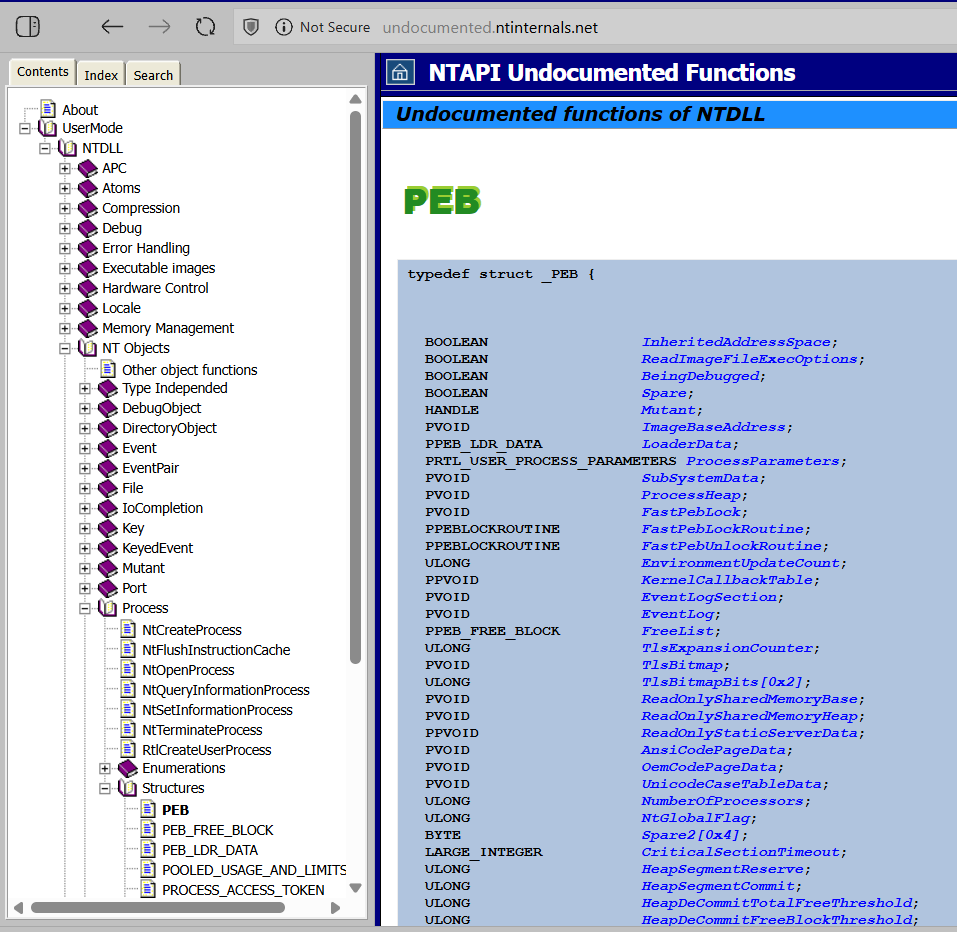
Note: The above functions use structures that are not officially documented by Microsoft, but can be found in projects such as NTAPI Undocumented Functions.
Section Overlap Using the Linker
Using strings in our code is practically inevitable, since we must provide the names of DLLs and their exported functions, which are resolved at runtime.
Our goal here is to offer a more didactic and pragmatic solution. This could be improved, for example, by adopting API Hashing techniques to deal with the strings mentioned earlier.
Section overlap consists of embedding one section inside another at compile-time. This allows the use of strings while still producing position-independent shellcode. Below is the compilation configuration (Makefile) used in this project.
MAKEFLAGS += -s

GCC     = x86_64-w64-mingw32-gcc
NASM    = nasm

INC     = -I include
CORE    = $(wildcard src/*.c)

CFLAGS := -Os -nostdlib -fno-asynchronous-unwind-tables
CFLAGS += -fno-ident -fpack-struct=8 -falign-functions=1 -w -mno-sse -s
CFLAGS += -ffunction-sections -falign-jumps=1 -falign-labels=1 -mrdrnd
CFLAGS += -Wl,-s,--no-seh,--enable-stdcall-fixup -masm=intel -fno-exceptions
CFLAGS += -fms-extensions -fPIC -IIncludes -Wl,-Tsrc/Linker.ld

OUT     = -o bin/pic.exe

LINKFLAGS   = -lkernel32 -lmsvcrt
WINDOWFLAGS = -mwindows

1:
    $(NASM) -f win64 src/StackAlign.asm -o bin/StackAlign.o
    $(GCC) $(INC) $(CFLAGS) $(CORE) bin/StackAlign.o $(OUT) $(LINKFLAGS)
    objcopy --dump-section .text=bin/pic.bin bin/pic.exe
It may seem confusing, but most of the flags here aim to optimize compilation and minimize file size. We won’t dive into them.
The CFLAGS variable is appended using += for better readability. At its end, there’s a -Wl argument that provides options to the linker during compilation.
The linker is the component that:
- Merges multiple object files (
.o) into a final binary (e.g.,.exe,.dll,.elf,.so). - Resolves cross-file references to functions and variables.
- Applies optimizations, address relocations, and links libraries.
It is through the linker that we can overlap PE sections using custom .ld files.
- The argument
-Wl,-Tsrc/Linker.ldtells the linker to use a custom script at./src/Linker.ld, which defines how sections will be organized.
Linker.ld
SECTIONS
{
    .text :
    {
        *( .text$A );
        *( .text$B );
        *( .rdata* );
    }
}
The above script reorganizes the .text section so that it becomes the union of .text and .rdata (this is possible only because both share the same permissions r-- and r--x; otherwise, it would raise an Access Denied error). Additionally, it segments the .text section into “sub-sections” like .text$A and .text$B.
Stack Alignment
The A and B sub-sections are designed to guide the code execution flow so that section A runs first, followed by section B. In this case, it’s necessary to align the stack before performing any operations, since Windows API functions may not behave correctly without proper stack alignment. This post does not aim to deeply explain the mechanism or the following code, but keep in mind that stack alignment is crucial.
The implementation consists of a short custom assembly stub that is compiled into an object and linked with the rest of the code.
StackAlign.asm
EXTERN __main
[SECTION .text$A]
        Start:
                push  rsi
                mov   rsi, rsp
                and   rsp, 0FFFFFFFFFFFFFFF0h
                sub   rsp, 0x20
                call  __main
                mov   rsp, rsi
                pop   rsi
                ret
Two key points:
- To execute the code in section A, include the line
[SECTION .text$A]. - To ensure that the
call __maininstruction refers to the__mainfunction inMain.c, we needEXTERN __main.
Proof of Concept
Now we just need to put all the pieces together, analyze the compiled file, and test it.
Compiling the project
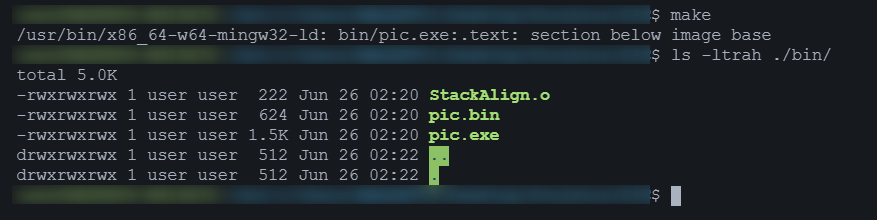
An object file for stack alignment and an .exe and .bin file were generated.
According to the provided Makefile, the last command uses objcopy to extract only the .text section from the compiled binary (pic.exe) and save it as pic.bin.
objcopy --dump-section .text=bin/pic.bin bin/pic.exe
Analyzing with PEBear
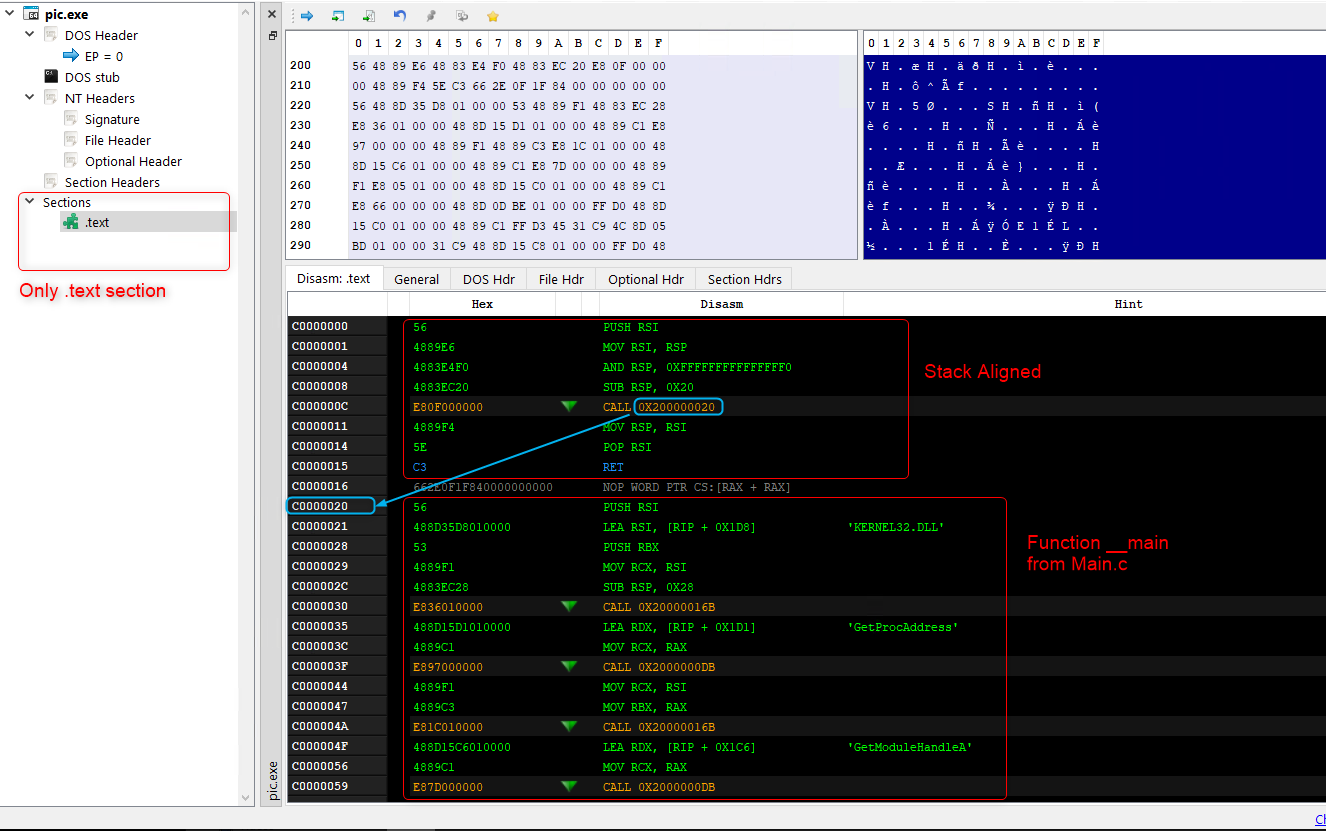
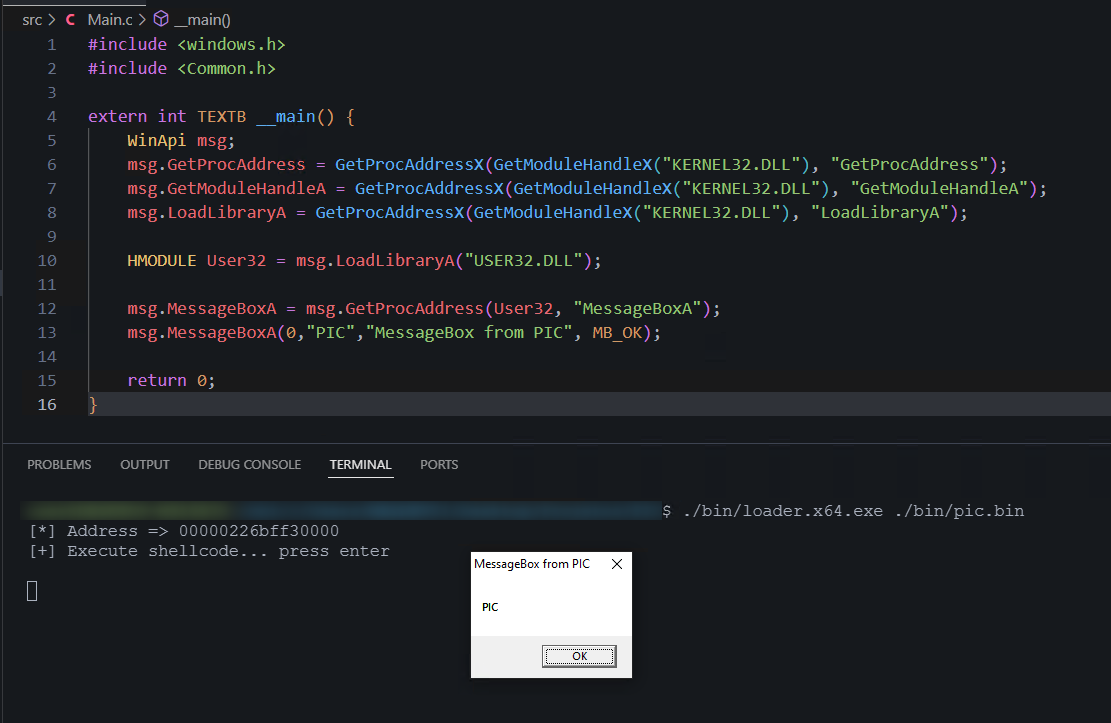
To execute the PIC, you can use any shellcode loader.
Using a generic loader to run the PIC
Acknowledgments
Oblivion Helped clarify concepts on dereferencing used in the custom GetProcAddress and GetModuleHandle functions, section overlap, and compilation tips.